The Receptionist That Never Sleeps.
Answers your business line around the clock — books appointments, takes orders, logs enquiries and dispatches jobs — set up for how your business works.
Pick your business. See what it does for you.
One AI front desk, set up for how your business works. Same plans and Portal for every type.
Service businesses
Salons, spas, physio, fitness, consultants — any business that books appointments.
Good for: Legal & consulting · Beauty & spas · Auto & repair · Veterinary & pet care · Real estate showings · Personal training & studios
- Books, moves and cancels appointments in each staff member's Google Calendar
- Recognises returning clients and remembers their preferences
- Fills cancellations from your waitlist by text (Growth and up)
- SMS confirmations and reminders
- Rooms and equipment pooled so nothing double-books (Clinical and Elite)
- Live handoff to your team, 90+ languages
Dental & medical
Patient scheduling by practitioner, operatory and equipment.
Good for: Dental offices · Medical clinics · Physio & specialists
- Books with the right practitioner, room and equipment
- PIN patient verification (Clinical and Elite)
- Waitlist, reminders and patient win-back (Growth and up)
- Pairs with in-room clinical transcription (Clinical and Elite add-on)
Pharmacy
A prescription refill line that collects what your pharmacist needs.
Good for: Independent and multi-location pharmacies
- Refills, emergency refills, transfers and new prescriptions logged
- Requests land in your Portal's refill queue; patient gets an SMS
- Controlled substances and clinical questions go to staff
- Refill reminders (Growth and up)
Restaurants
Takeout and delivery orders by phone, even at the dinner rush.
Good for: Pizza · Takeout & delivery kitchens · Family restaurants
- Answers menu questions and texts the menu
- Builds, changes and cancels orders; regulars reorder past orders
- Delivery zones with fee and minimum order
- SMS confirmation; optional webhook to your kitchen or POS system
Field service
An AI dispatcher for HVAC, plumbing, electrical and repair (Elite plan).
Good for: Home services · HVAC · Plumbing · Electrical · Appliance repair
- Guided troubleshooting with safety steps first
- Customer equipment records and parts lookup by model
- Job length estimated from the diagnosis
- Books a technician with the right skills who covers the area
Info desk
For businesses that answer questions rather than book appointments.
Good for: Showrooms · Building supplies · Property management · Storage · Event venues
- Answers from your own knowledge base: hours, stock, prices, policies
- Logs every enquiry with the caller's details
- Transfers real leads to your team
- Built for showrooms, supply stores, property and venues
Included for every business.
Whatever your business type, every plan comes with these.
Natural conversation
No "press 1". Callers speak normally, interrupt, change their mind — the AI keeps up.
Remembers your customers
Recognises returning callers and keeps their preferences and history in your Portal.
Live handoff
Recognises when a caller needs a person and transfers the call to your team.
90+ languages
Answers in the caller's language and switches mid-call if they do.
Spam & robocall protection
Carrier call verification and speech checks; repeat offenders are blocked silently.
SMS confirmations
Callers get a text confirming what was booked, ordered or logged.
Call summaries
Every call is summarised with the outcome and next steps in your Portal.
Captures what it can't answer
Questions your information doesn't cover are logged for you to answer once. How it works →
Pause bookings any time
Turn AI bookings off from your Portal — for a holiday, an emergency or a busy day.
Your data, kept separate
Encrypted at rest and in transit, stored in Canada and isolated per business. We process it for you; it's never used to train AI models.
Monitored around the clock
Errors on live calls alert our team straight away.
Nightly analytics
Calls, outcomes and trends in your Portal every morning.
Multi-location (Elite)
One AI for every branch, each with its own staff, hours and context.
How the AI answers your customers.
It answers from what you tell it. When it doesn't know, it says so and writes the question down for you.
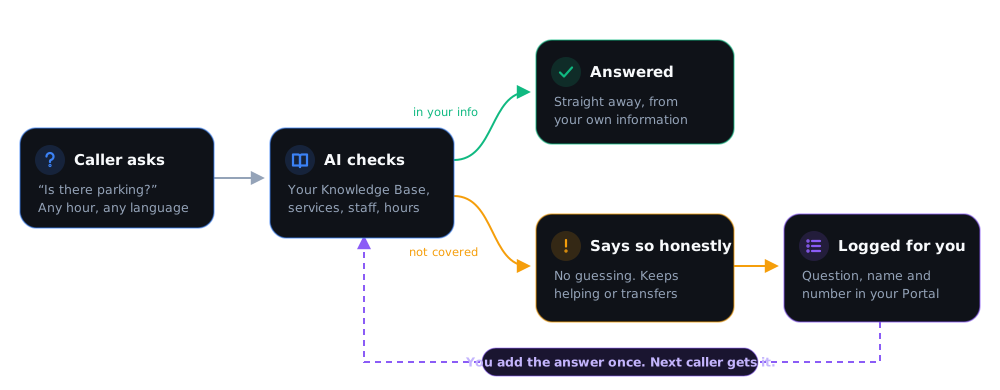
Add topics to the Knowledge Base in your Portal: parking, prices, policies, what to bring, anything callers ask. Your services, staff, hours and locations are already known from your setup.
Callers get an answer straight away, in their own language, at any hour. The AI does not guess or make up prices and policies.
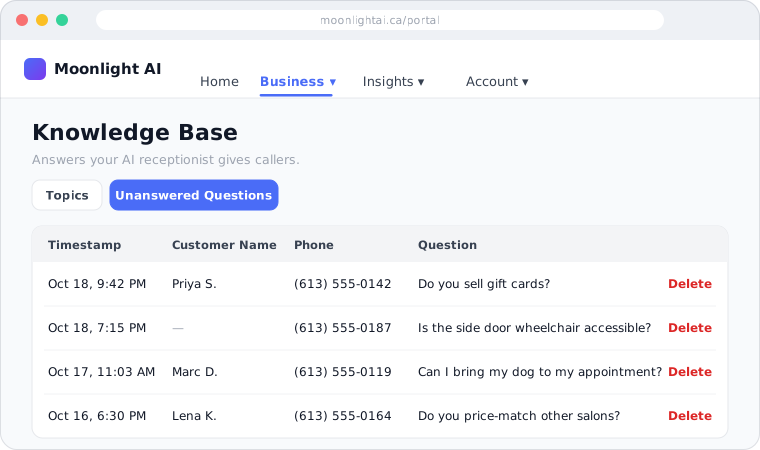
If the answer isn't in your information, the AI tells the caller honestly and logs the question, with the caller's name and number, to Unanswered Questions in your Portal. It then carries on helping, or transfers the call to your team.
Read the list, add the missing answer to your Knowledge Base, and the next caller who asks gets it. You can also call the customer back. The longer you use it, the fewer questions it misses.
What you see in your Portal:
No enquiry gets lost.
Every call leaves a record your team can act on.
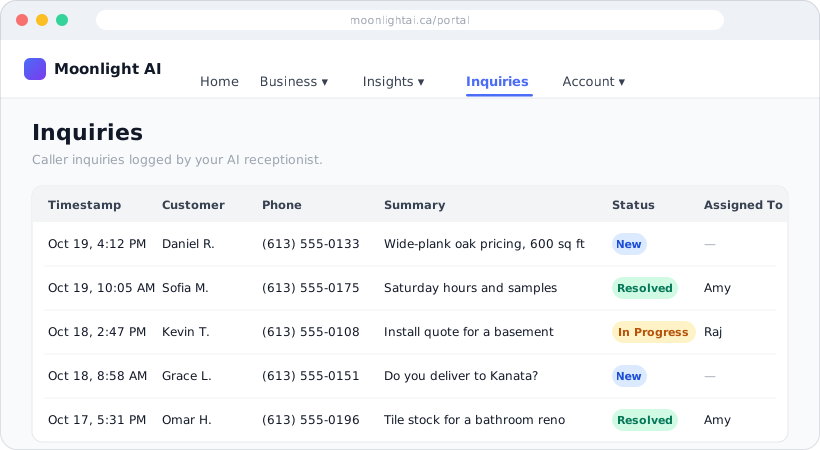
Enquiry log
Info desk businesses get an Inquiries page: caller name, number, what they wanted and the details. Mark each one New, In Progress or Resolved and assign it to a staff member.
Call log for every call
Date, caller, call type, outcome, service, staff member, sentiment and a short note, for every business type.
Unanswered questions
The questions your callers asked that your information didn't cover. A to-do list for your Knowledge Base, and a list of people to call back.
Hot leads go to a person
When a caller is ready to buy or asks for a person, the AI transfers the call to your team.
Caller gets a text
The caller gets an SMS confirming what was booked, ordered or logged, so they know it was received.
Every caller in your CRM
Returning customers are recognised, and their history and preferences are there when you call back.
Run your front desk from one place.
Sign in from any browser with Google or your email. No app to install. You see only the pages your business type needs.
Setup
Services, staff, locations and hours. Change them any time and the AI uses the new details on the next call.
Appointments & CRM
Every booking the AI made and every client it spoke to, with notes and preferences.
Knowledge Base
The answers the AI gives, written and edited by you, plus the Unanswered Questions list.
Call screening & waitlist
Block numbers and see who is waiting for a cancellation.
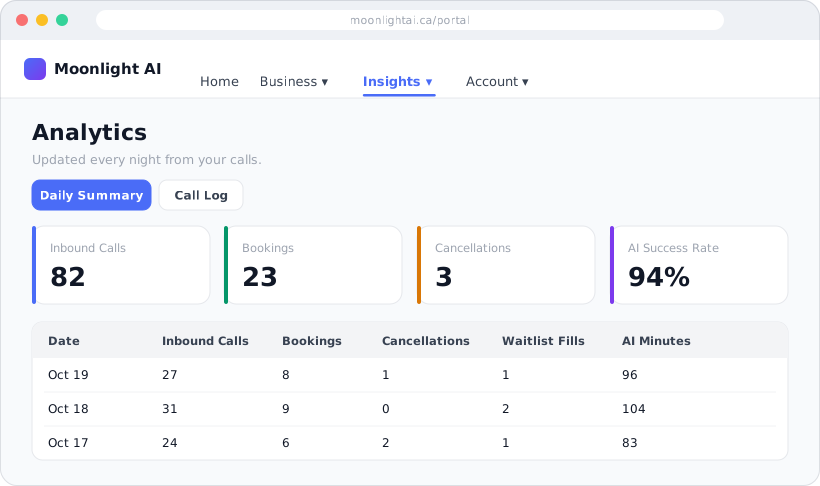
Analytics
A daily summary (calls, bookings, cancellations, enquiries, AI minutes) and the full call log.
Pages for your business type
Refill queue for pharmacies. Menu, orders and delivery zones for restaurants. Technicians, parts and service zones for trades. Inquiries for info desks.
Settings
Turn features such as reminders on or off and change your business settings any time.
Products & billing
See your plan and billing, and add other products such as clinical transcription or outreach.
What a call leaves behind.
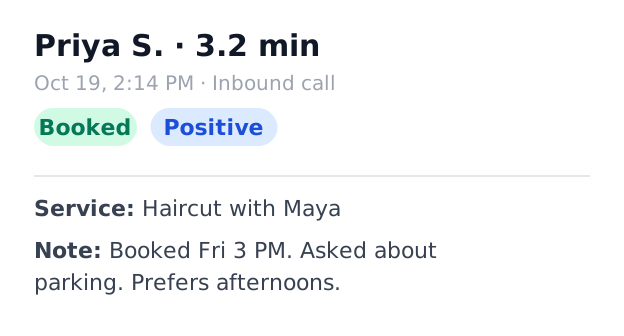
Call summaries
Every call summarised with sentiment and action items.

Native fluency
Detects the caller's language and switches mid-sentence.
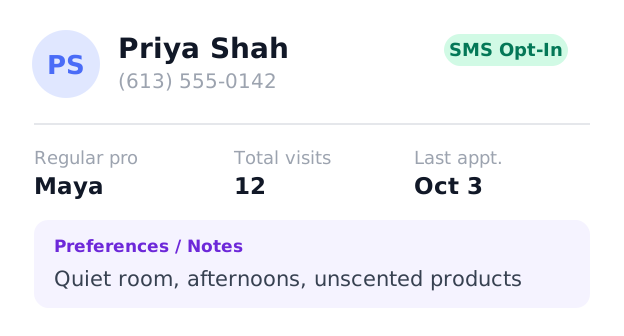
Customer memory
Preferences and notes saved to your records after each call.

One AI.
Unlimited Locations.
Managing a franchise or a multi-city practice? Agentic Front Desk is built for scale. Our branch-locked architecture ensures that every call is handled in the local context of the specific clinic being dialed.
-
Native Timezone Intelligence (UTC-12 to UTC+12)
-
Branch-Specific Staff & Resource Mapping
-
Unified CRM across your entire network
Ready to stop missing calls?
Sign up in about 10 minutes, set up your business in the Portal in about 30, and your line goes live automatically, usually within a day.
- A Google account — you sign in to your Portal with it. If you take appointments, your staff calendars need to be in Google Calendar.
- Your legal business name and business address.
- US businesses only: your website with a privacy policy page and an SMS policy page (what to put on them), and your EIN. US mobile carriers require a registration before your texts are delivered.
Calls are answered from the day you go live. Canadian businesses' text confirmations work from day one; in the US they start once carriers approve your registration, usually 5–8 business days after signup. See every setup step →